The AI assistant for your HOA. A helping hand, any hour.
Porch is built into every page of Gablekin. It answers residents from your own documents and records, prepares the paperwork for the board and the manager, and acts only when a person confirms.
Boats need to be stored in an enclosed garage or an approved storage area, rather than in your driveway. [1]
Want me to help you find an approved storage option?
One assistant. Something for every role.
Porch sees what the person asking may see, and nothing more. Here’s what it does for each of them today.
Owners and residents
The everyday questions, answered from your own account and your community’s records.
Can I park a boat in my driveway?
Answered from your CC&Rs, with the section.What do I owe?
The balance and invoices, and a payment link for you to confirm.The streetlight on Elm is out.
Porch drafts the report and checks it isn’t reported already.Any update on my sprinkler ticket?
The status of your requests and home changes.Anything new?
What changed since your last visit, announcements and events.How do I add a co-owner?
Step by step, from Gablekin’s help articles.
Owners, about their own home
Answers from the home’s private record, which only its owners see.
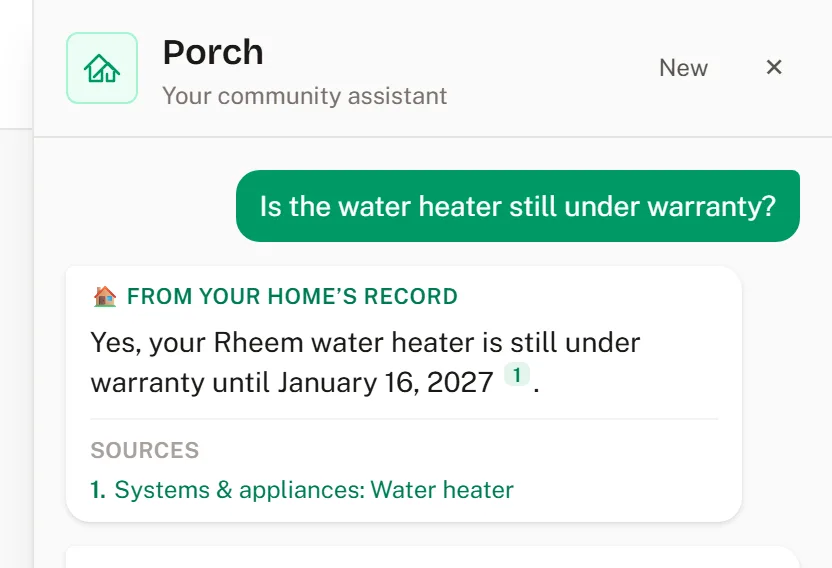
Is the dishwasher still under warranty?
Answered from the record, showing the entry it used.When did we last service the furnace?
From the repairs you’ve logged.- Send a photo of an appliance label or a receipt: Porch proposes the entry for you to add.
Renters
The community’s rules and news, never the owner’s business.
When is trash day?
Answered from the community’s documents.- Reports an issue in a common area, with the renter’s OK.
- Points to the owner for the home itself: repairs, the lease, the rent.
The board, the treasurer and committees
The numbers and the paperwork, prepared for a person to check.
How did we do against budget?
From the community’s own books, for the board.- Drafts the monthly report’s summary from its figures, and only those figures. Porch Plus
- Reads an uploaded invoice and fills in the bill form for the treasurer to check. Porch Plus
- Checks a home change request against your guidelines, citing the rule, and drafts the decision letter. The committee decides. Porch Plus
The manager
The routine handled, and the rest arriving ready to act on.
- Routine questions answered before they reach you; hand-offs arrive as a request with a summary.
- Every new issue comes with a suggested category, priority and likely duplicates.
- Drafts replies, summarises long threads, and turns bullet points into an announcement. Porch Plus
- Drafts each violation notice quoting the rule and section, and flags repeat violations. Porch Plus
Setting up
Beside every setup step, from the first spreadsheet.
- Points out likely problems in your data, such as homes with nobody yet, with a link to fix them.
- Answers setup questions from Gablekin’s setup guide.
The same jobs, without the back-and-forth.
What everyday tasks look like with email, spreadsheets and PDFs, and what they look like with Porch.
Less waiting, less arguing, less chasing.
Most HOA friction isn’t about the rules. It’s about not knowing, waiting to hear, and saying it all again.
Answers any hour
Not just in office hours, so volunteers get fewer calls at 10 pm.
The rule, not an opinion
Every answer about a rule shows the document and section, so there’s less arguing about what it says.
No confident wrong answers
When your documents don’t say, Porch says so and offers to reach a person.
Nobody repeats themselves
Hand-offs carry a summary. When someone is frustrated, Porch offers a person instead of going round in circles.
No hunting through emails
What changed since your last visit, and a weekly digest each person can turn off.
No surprises
Nothing is sent, reported or paid until you confirm it.
Ask about your own home.
Owners ask Porch about their home: “Is the dishwasher still under warranty?”, “When did we last service the furnace?”. Porch answers only from the home’s private record, cites the entries it used, and never shares it. Send it a photo of an appliance label and it proposes the entry for you to add.
Your own rulebook. The page to prove it.
Porch answers from your community’s documents—not from a guess about how other neighborhoods work. Open a citation to see exactly where the answer came from.
Can I park a boat in my driveway?
Boats must be stored in an enclosed garage or an approved storage area. [1]
[1] Section 4.3 — Vehicle storage. Driveway storage of boats and recreational vehicles is not permitted.
Porch suggests. You confirm.
Before anything changes, you see the details and make the call. Confirm to proceed, or cancel and leave things as they are.
Report an issue
Review the location and details before sending a maintenance request.
Add a comment
Check your message before it is added to a request.
Prepare a payment
Confirm a secure payment page. Payment is completed separately on Stripe.
Reach a real person
Ask for a hand-off to your community manager, whenever you need one.
Ask Gablekin from Claude.
Connect Gablekin to Claude, or another AI assistant that supports connectors, and ask about your dues, rules and repairs from the assistant you already use. It sees only what you can see in Gablekin, and anything it proposes waits for your confirmation.
“What do I owe my HOA, and is anything overdue?”
- Sign in once with your Gablekin account
- See only what you’re allowed to see
- Revoke access any time from Connected apps
What Porch won’t do.
Guess at the rules
When a source doesn’t answer the question, Porch says so.
Act without your say-so
Reporting, paying, commenting and escalating require confirmation.
Peek at your neighbors’ data
Your balance and private requests stay yours.
Ask for your card number
Payment information belongs on Stripe’s secure checkout, never in chat.
Porch for everyone, in every plan.
Every plan includes Porch for every resident, up to a monthly allowance of questions, plus the suggested triage of new issues and Porch’s setup help. Porch Plus adds the AI drafts for the board and the manager, and a larger allowance.
- Every plan can try three AI drafts a month, to see what Porch Plus does
- Nothing in Gablekin depends on Porch Plus: you can always write it yourself
- The manager sees the month’s use on Settings
Porch is just getting started.
What we’re building next. These aren’t available yet; we’ll mark them as available when they are.
- Understands photos of a problem and fills in the reportComing soon
- Replies in your languageComing soon
- Voice and phone conversationsComing soon
A little more about Porch.
Is Porch an AI?
Yes. Porch is an AI assistant, and it says so when asked. It runs on Google’s Gemini models in Google Cloud.
Can Porch see other residents’ information?
No. Porch works with the same permissions as the person asking: their own account and their community’s shared information, nothing more.
What if Porch doesn’t know the answer?
It says so, instead of guessing, and offers to hand the question to your community manager.
Is Porch a replacement for our community manager?
No. Porch helps with routine questions and tasks, and prepares drafts for people to check. Residents can always ask to hand off to a real manager, and decisions stay with the board and committees.
What comes with every plan, and what is Porch Plus?
Every plan includes Porch for everyone up to a monthly allowance, the suggested triage of new issues and setup help. Porch Plus adds the AI drafts (replies, summaries, announcements, violation notices, home change checks and letters, the monthly report summary, invoice reading) and a larger allowance. Every plan can try three drafts a month.
Where do answers about our rules come from?
Your own uploaded CC&Rs, rules, minutes and FAQs. Answers about rules include references so you can check the original document.
Will Porch make a payment for me?
Porch can propose creating a payment page, after your confirmation. You still review and complete the payment through Stripe.
Is this example connected to my real community?
No. These are scripted examples using fictional community data. Nothing in this demonstration creates a real payment or maintenance request.
Bring your community
a little closer.
See what a calmer day looks like. Let’s walk through it together.